
Basecamp 101
What is Basecamp?
Basecamp is traditionally a project management platform. However, at Teal we predominantly use it for communication and file sharing with our clients!
Basecamp for communication
At Teal, rather than use standard email clients as our primary method of communication, we use Basecamp Messages.
We do this so that shared visibility is embedded in every phase of the project. In Basecamp, everyone sees the same version of the full conversation. This way everyone’s always on the same page. No more forwarding emails to bring people up to speed!
Since not everyone needs to know about things as they happen. Basecamp only notifies the people who need to know, so no one’s unnecessarily distracted.
You can easily embed images or videos into messages, react to messages that don’t require a full response, tag specific people for necessary items requiring attention, share links with others to threads or messages.
Curious about how it all works? Let’s dive into it!
Basecamp Messages Tutorial
Basecamp via email
To start, one of the nice things about Basecamp is that, if you choose, you can still simply reply to messages from your email provider. Basecamp messages will notify you via email and will come through from this sender:

You will then have the option directly from your email to simply respond as if it were a normal email or to “Respond in Basecamp”:

Basecamp Direct
If you opt to use Basecamp as the online platform it is intended to be, your view of messages will look something like this:
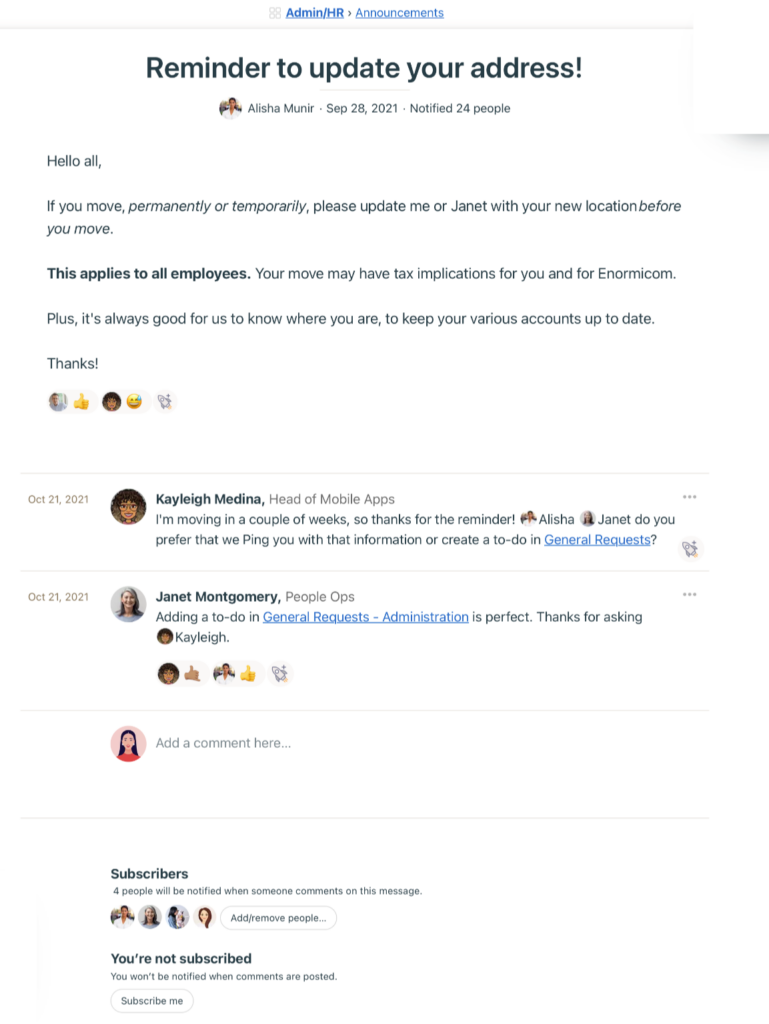
“Adding a comment” would be the equivalent of sending through an email response in the thread.
You can also Add/ Remove people as you see fit for a given “Thread” (email chain) so as to only notify the necessary people.
Basecamp also provides an easy-to-access platform for quickly searching through the entire history of communication for a given project! Simply click into the “Message Board” for your project and scroll through the history of communication, organized by dedicated threads!

Basecamp Pings
Need someone directly and quickly? Ping ‘em!

This acts as your standard chat- you can ping someone directly or create a smaller group to discuss something quickly that may not necessarily require an entire dedicated thread!
The great thing about Pings is that they still send email notifications as well!
Basecamp for file sharing & reference
Every project includes unlimited space to organize, share, and store docs, files, and images under “Docs & Files”:

- Link Google Docs and discuss them in Basecamp
- Simple drag and drop upload
- Discuss files directly on the file or image itself
- Every file includes a complete version history
- Reorder and color code files to keep things tidy
- Works with cloud files from Figma, Airtable, Dropbox, and dozens more:
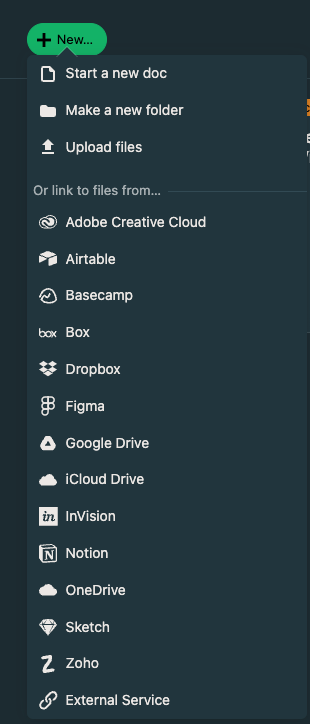
Simply go to “Docs & Files” in your Basecamp project board, Click “New” and select the type of file you would like to attach to the project board!
These Docs & Files can also be organized into folders by topics as well.
At Teal, we like to organize “Docs & Files” by Project Phase, housing any relevant deliverables, timelines, or meeting recordings/ transcriptions in a dedicated folder!